All-in-One PDF Editor App for iPhone & Android
Scan, Convert, Edit, and Sign PDFs in seconds — free, offline, no account needed
Why PDF Tools Are Frustrating
If you've ever needed to edit a PDF on your phone, you know the drill. Most solutions have the same three problems:
Adobe Acrobat costs $20+ per month. For something you use a few times a year, that's a bad deal.
Web-based tools upload your documents to unknown servers. Your contracts, tax forms, and medical records shouldn't be in the cloud.
Enterprise PDF software is built for teams and complex workflows. You just need to sign a lease or convert a file.
PDF Editor solves this. It's a free app that works entirely on your device — no subscriptions, no uploads, no complicated toolbars. Just the features that most people actually need, offline, whenever you need them.
Everything You Need to Work with PDFs
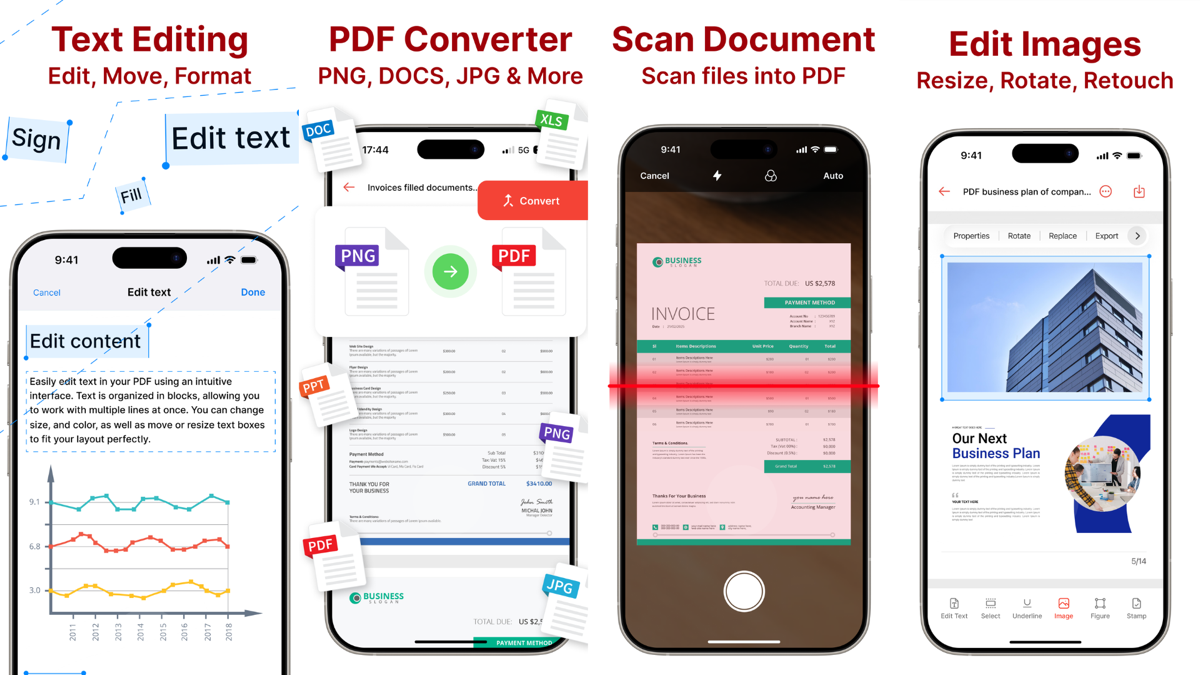
Scan to PDF with OCR
Turn your phone into a document scanner. Capture any document with your camera — the app automatically corrects perspective, enhances clarity, and uses OCR to extract searchable text.
- Camera-based document scanning
- Automatic perspective and exposure correction
- On-device OCR — text becomes searchable
- Combine multiple scans into one PDF
PDF Converter — Any Format
Convert PDFs to Word, Excel, or images and vice versa. Need a DOCX from a PDF? Turn a spreadsheet into a shareable PDF? Done in seconds, all on your phone.
- PDF ↔ Word (DOCX) conversion
- PDF ↔ Excel (XLSX) conversion
- PDF ↔ JPG / PNG
- No internet required
Edit & Annotate PDFs
Make changes directly to your PDFs. Highlight text, add notes, draw diagrams, reorder pages — all from your phone or tablet without sending files anywhere.
- Highlight, underline, and strike through text
- Add text boxes and freehand drawings
- Rearrange, delete, or rotate pages
- Adjust margins and page sizes
Sign PDFs on Your Phone
Sign documents legally and securely without printing. Draw your signature or type it, fill form fields with a tap, and send back signed documents in under a minute.
- Draw or type your signature
- Fill interactive PDF forms
- Add initials and signature stamps
- Works with government and legal forms
Merge, Split & Protect
Organize your documents your way. Merge files into one PDF, split large documents, compress for email, or lock sensitive files with a password.
- Merge multiple PDFs into one
- Split PDFs into separate files
- Compress to reduce file size
- Password-protect sensitive documents
See It in Action
Watch how PDF Editor handles real-world tasks — from scanning a receipt to signing a contract — in under 60 seconds.
Real Situations Where PDF Editor Saves the Day
Sign a Lease Without Printing
You receive a lease as a PDF. Page 12 needs your signature. No printer, no Adobe subscription. Open PDF Editor, draw your signature, email it back — signed in under 2 minutes.
Convert a Word Doc to PDF
Submitting an application that requires a PDF? Your file is in Word format. Convert it directly on your phone — no internet, no online converter, no uploading private documents.
Scan Receipts for Tax Season
Snap photos of receipts with your camera. PDF Editor straightens them, extracts the text via OCR, and saves them as organized PDFs. No messy photo library.
Fill Out a Government Form
DMV, IRS, or insurance sends you a PDF with form fields. Fill it on your phone, sign it, and submit digitally — no printing, no scanning required.
Merge Multiple Documents
Combine a cover letter, resume, and references into one PDF. Merge loan documents for your bank. Select the files, tap merge — one shareable PDF, done.
Redact Sensitive Information
Before sharing a contract, hide your salary figures or personal details using drawing and text tools. Share only what you intend to share.
See Every Feature in Action
Designed for real-world use — clean interface, no learning curve, instant results.
How PDF Editor Compares
The honest comparison against the most common alternatives:
| Feature | PDF Editor | Adobe Acrobat | Free Web Tools |
|---|---|---|---|
| Cost | Free | $20/month | Free |
| Works Offline | Yes | Yes (Pro) | No |
| Privacy (Local Processing) | Yes — on-device | Cloud | Cloud upload |
| Sign PDFs on Phone | Yes | Yes | Limited |
| Scan to PDF + OCR | Yes | Yes (Premium) | No |
| Convert PDF ↔ Word/Excel | Yes | Yes | Limited |
| Edit & Annotate | Yes | Yes | Limited |
| iOS & Android | Both | Both | Web only |
The bottom line: Adobe Acrobat wins on team collaboration and advanced workflows. But for individuals who need to sign documents, convert files, and edit PDFs — PDF Editor gives you 90% of the capability at 0% of the subscription cost, with better privacy.
How It Works — 3 Steps
Designed to be simple. No manual needed.
Open or Scan
Import a PDF from your files, cloud storage, or scan a new document with your camera.
Edit, Convert, or Sign
Annotate, fill forms, add your signature, convert to another format, or merge multiple files.
Save or Share
Save to your device, export as a different format, or share via email, messaging, or cloud storage.
Frequently Asked Questions
Is PDF Editor really free?
Can I sign PDFs on my iPhone or Android for free?
Does it work offline?
Do my documents get uploaded to a server?
What file formats does the PDF converter support?
Are e-signatures from PDF Editor legally valid?
How does the Scan to PDF feature work?
What if I have a password-protected PDF?
Download PDF Editor — Free
Available on iPhone and Android. No account required. Works offline. Completely free.
Already using it? A review on the App Store or Google Play helps more people find it — and it means a lot to an indie developer.
Other Tools by Petro Hrys
More productivity apps built for individuals, not enterprises.
Related Articles
Practical guides on working with PDFs and managing documents on your phone.
A practical guide to the top PDF editor app for mobile — what it does, who it's for, and why it beats expensive alternatives.
A step-by-step guide to signing PDFs from your iPhone — no subscription, no printer.
Reduce PDF file size without losing quality. Perfect for email attachments and limited storage.