March 2026
The 50/30/20 Budget Rule: A Simple Framework for Your Money
Learn how to divide your income into three categories and build a sustainable budget that actually works.
Read article →
Track your spending in 30 seconds. Get smart insights. Reach your goals. No bank account linking. No subscription fatigue.
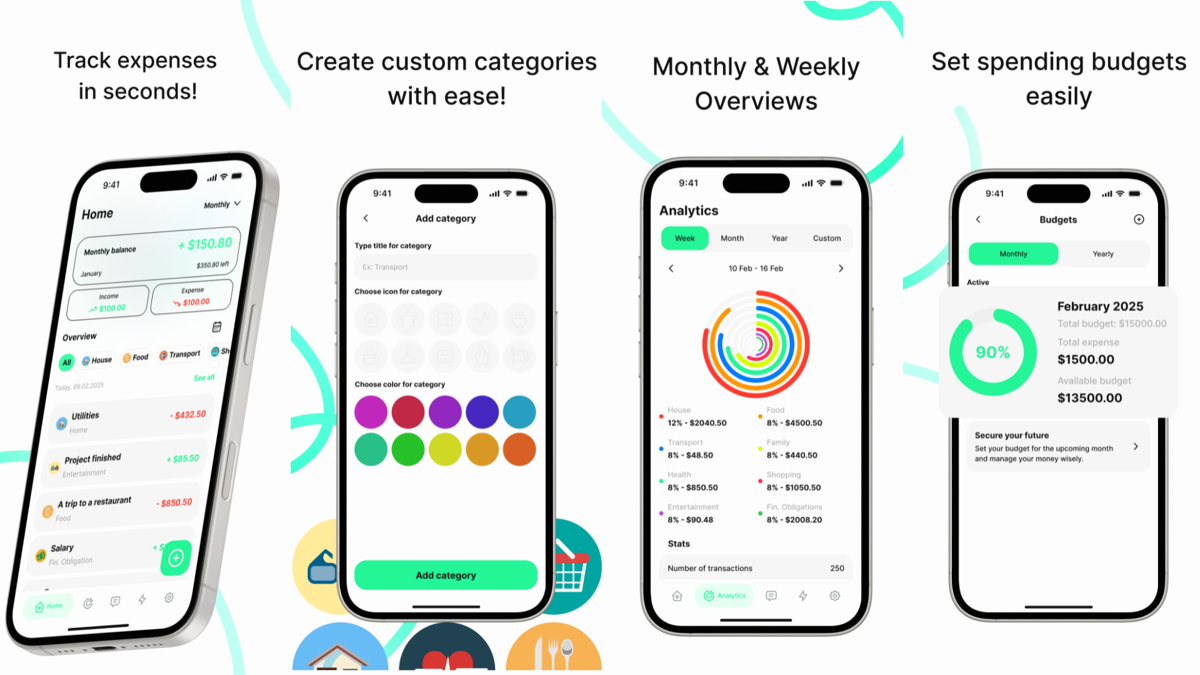
Manually tracking every expense in a spreadsheet takes time and discipline. Most people give up after a few weeks.
Popular budget apps require linking your bank account. That's a privacy risk for what should be simple expense tracking.
Budget apps charge monthly for basic features. You shouldn't need to pay $10-15/month just to track expenses.
Simple, powerful features that keep you in control of your finances
Log expenses instantly. See your spending broken down by category, day, or month with colorful, easy-to-read charts.
Create your own categories that match how you spend. Groceries, rent, coffee, subscriptions—organize it your way.
Get automatic analysis of your spending patterns. Discover where your money goes, find saving opportunities, and spot trends.
Set goals for anything—vacation, emergency fund, new laptop. Track progress with visual milestones that keep you motivated.
Track multiple income sources and see your overall balance at a glance. Understand what you earn, what you spend, and what you have.
Estimate your electricity usage and costs. Understand your utilities at a glance without digging through bills.
Privacy first: All data stays on your device. We never sync to external servers. Your financial information remains completely private.
Free and premium: Core budget tracking is free. Premium adds advanced analytics and features.
Perfect for anyone serious about understanding their money
Track business expenses separately from personal spending. Get ready for tax season with clear categorized records.
Living on a tight budget? Track exactly where your money goes and find ways to stretch it further.
Coordinate household spending across multiple people. See what the family spends on groceries, utilities, and activities.
Prepare for tax season with well-organized expense records. Export your data in a format that accountants appreciate.
Save for a specific goal—dream vacation, car, house down payment. Watch progress grow month by month.
Track your spending while paying down debt. See exactly how your budget changes each month as you progress.
| Feature | Pocket Manager | Mint/YNAB | Spreadsheets |
|---|---|---|---|
| Fast expense entry | ✓ | ✓ | ✗ |
| Privacy (no bank linking) | ✓ | ✗ | ✓ |
| Smart insights & analytics | ✓ | ✓ | ✗ |
| Savings goals | ✓ | ✓ | ✗ |
| Free core features | ✓ | ✗ | ✓ |
| Works offline | ✓ | ✗ | ✓ |
| Automatic expense detection | ✗ | ✓ | ✗ |
Get Pocket Manager from the App Store or Google Play. Set your budget and custom categories—takes less than 5 minutes.
Every time you spend, add it to Pocket Manager. It takes 30 seconds. Tap category, enter amount, done. That's it.
Watch your spending trends appear automatically. Adjust your budget. Work toward your savings goals. Stay in control.
Yes. All your data stays on your device. We never sync to external servers, never see your financial information, and never share data with third parties. Your budget is completely private.
No. Unlike many budget apps, Pocket Manager doesn't require or support bank account linking. You manually log your expenses, which gives you more control and better privacy.
Core budget tracking is completely free. We offer a premium tier for advanced analytics and additional features, but the main app is free to use forever.
Yes. Pocket Manager is available on both iOS (iPhone) and Android. Since data stays on your device, you'll need to set it up separately on each phone.
Your data is stored locally on your device. We recommend backing up your phone regularly using iCloud (iOS) or Google Drive (Android). You can also export your data from the app's settings.
Yes. Pocket Manager lets you export your expense data in standard formats that work with other apps and spreadsheets. Your data is yours to keep.
We release updates regularly with bug fixes, performance improvements, and new features based on user feedback. Check the app store for the latest version.
Download Pocket Manager today and start tracking smarter.
Learn strategies to save more, spend wisely, and reach your financial goals
Learn how to divide your income into three categories and build a sustainable budget that actually works.
Read article →Subscriptions, apps, and small purchases add up. Discover where your money really goes and how to take control.
Read article →Setting savings goals is easy. Actually reaching them is harder. Here's the framework that works.
Read article →